
traderbase
Stock ScannerPricing
Log inJoin interest list
All articles
Chart reading/July 12, 2026/ 5 min read

VWAP Is Context, Not a Command

How to use VWAP as an intraday reference without turning every touch or reclaim into an automatic trade.

By TraderBase · Updated July 12, 2026

In this article

  1. 01What VWAP actually describes
  2. 02Reclaim versus rejection
  3. 03Validate the event against the chart
Abstract teal market signals converging on selected points across smoked glass.
Abstract teal market signals converging on selected points across smoked glass. Illustration by TraderBase.
01

What VWAP actually describes

VWAP estimates the session’s volume-weighted average traded price. Unlike a fixed-period moving average, it incorporates where volume occurred and resets for the trading session. That makes it a useful reference for whether current price is trading above or below the session’s volume-weighted center.

A line on a chart is not a reason to trade by itself. VWAP becomes useful when it aligns with structure, participation, and a defined risk point.

02

Reclaim versus rejection

A reclaim needs more than a momentary print above the line. Look for acceptance: closes above VWAP, improving volume, a higher low, and room before the next resistance level. A rejection is stronger when price tests from below, cannot hold, and sellers regain control with expanding volume.

  • Check whether the stock is extended before the VWAP interaction.
  • Use the same session and timezone across candles, executions, and annotations.
  • Define the level that invalidates the reclaim or rejection before entering.
  • Record whether VWAP was the setup, confirmation, or merely context.
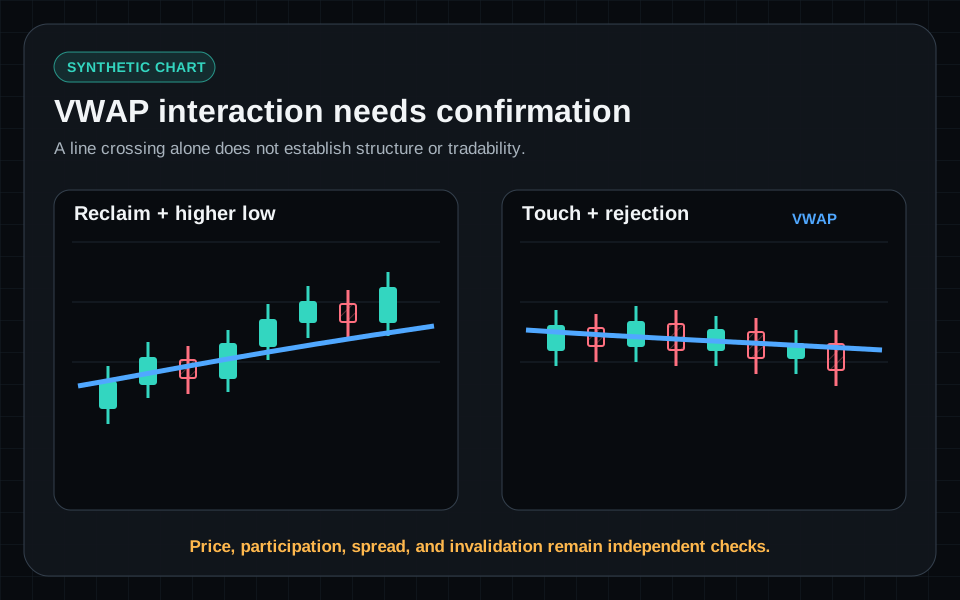
Two synthetic charts comparing a VWAP reclaim with supporting structure against an isolated VWAP touch without confirmation.
VWAP is a session reference. Structure, participation, spread, and distance from invalidation determine whether the interaction adds context.
synthetic chartIllustrative example · Synthetic data · Not live market data
03

Validate the event against the chart

A VWAP scanner event should carry its provider timestamp and measured trigger into the linked chart. Compare the event with the same session candles, volume, nearby resistance, and available catalyst context before deciding whether the move has acceptable structure.

Educational content only. Trading involves substantial risk, and scanner events are not recommendations to buy or sell securities.

Explore related scanner tools

Momentum scanner Scanner documentation Related learning paths Plans and limits

Continue reading

Chart reading

Plan the Opening Range Before You Trade the Break

6 min read
Volume scanners

Unusual Volume Scanner Filters That Add Context

8 min read
View all articles

TraderBase is a stock-scanning and market-intelligence platform combining configurable momentum scanners, streaming alerts, and TradeBase Agent.

Product

  • Stock Scanner
  • Stock Alerts
  • Pricing

Resources

  • Blogs
  • RSS Feed
  • Learning Center
  • Documentation
  • Help Center
  • Changelog
  • Contact

Company

  • About
  • Security
  • Market Data
  • Roadmap
  • Status

Legal

  • Terms
  • Privacy
  • Privacy Request
  • Cookies
  • Refund Policy
  • Acceptable Use
  • Trading Disclaimer
TraderBase scanner outputs identify configured market conditions and can be delayed, stale, incomplete, unavailable, or incorrect. They are not personalized investment recommendations or instructions to buy or sell. TradeBase Agent does not place orders or manage positions. Generated content may contain errors and should be checked against cited sources. Data availability and timing depend on providers and account configuration. Trading securities can result in substantial loss. Legal and regulatory classifications remain under attorney review.
© 2026 TraderBase. All rights reserved.