TraderBase scanner docs
TradeBase Agent overview
Use TradeBase Agent to retrieve, organize, and explain authorized market information across the workspace.
Maintained by TraderBase · Updated
What TradeBase Agent is
TradeBase Agent is TraderBase’s market-information layer. It can use bounded, explicitly supplied page context and approved read-only tools to review scanners, signals, alerts, news, filings, watchlists, tickers, and market activity.
The Agent panel and full-page workspace use the same threads, policy, tools, usage controls, and response components. Closing the panel does not discard the current thread. Page context is separate from conversation history, is shown as removable chips, and changes when you navigate.
Open the Agent sidebar
Select Open TradeBase Agent from the workspace header. The sidebar opens beside the current module instead of replacing it. The Current context chip identifies the page that can supply bounded scanner, alert, ticker, news, or workspace evidence. Clear that chip when you want the next question to ignore page context.
Use the controls in the sidebar header to start a new thread, reopen thread history, adjust Agent settings, or close the panel. Closing the panel keeps the thread available; clearing page context removes the active module from the next request.
Run an Agent Brief
Choose Agent Brief when you want a bounded overview of the current module. On a workspace, the brief can organize recent session changes, active symbols, signal types, alert counts, and unavailable sources. On scanner, alert, news, and ticker pages, the available evidence changes with that page.
Read the result as a research summary, not as a trading plan. Check the session and market date first, then review the named symbols and events, and finally note any unavailable, delayed, or missing data.
Ask a page-aware question
Describe the outcome and the evidence you want compared. Useful requests include:
Compare the first five scanner rows by relative volume, dollar volume,
range position, and update time. Call out missing fields.
Explain the latest alert events, including repeated hits and the time
since each symbol's previous event. Do not recommend a trade.Summarize the active ticker's price-volume context, available catalyst,
scanner membership, and data freshness.Use Explain with Agent when a module offers it for the selected row or event. This supplies the measured item as explicit context so the response can explain the match without guessing which row you meant.
What it can explain
TradeBase Agent can summarize changes, explain deterministic scanner matches and signal events, compare factual symbol data, build catalyst timelines, identify cross-scanner overlap, and call out missing, delayed, stale, or unavailable data.
Deterministic TradeBase services calculate counts, rankings, scanner membership, signal events, alert state, and market values. Generated content organizes those facts; it does not replace the market engine.
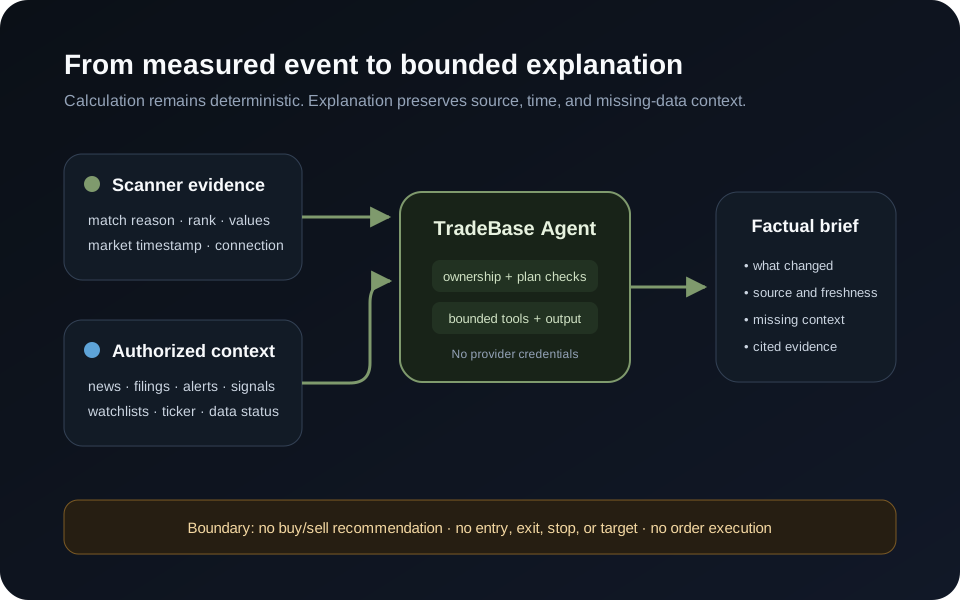
Safety boundary
TradeBase Agent does not recommend buying, selling, going long, or going short. It does not provide entries, exits, stops, targets, guaranteed predictions, position management, or order execution.
Generated content may contain errors. Verify important market information using the cited source and its timestamp.
Availability and limits
Agent access, request allowance, history, and advanced tools are enforced by the server from the authenticated account. Requests use bounded context, tool-call, output, timeout, rate, and cache limits. A private cached result is scoped to the requesting user.