TraderBase scanner docs
Agent tools and sources
Understand the authorized TradeBase data tools, ownership checks, limits, and source treatment used by TradeBase Agent.
Maintained by TraderBase · Updated
Authorized TradeBase tools
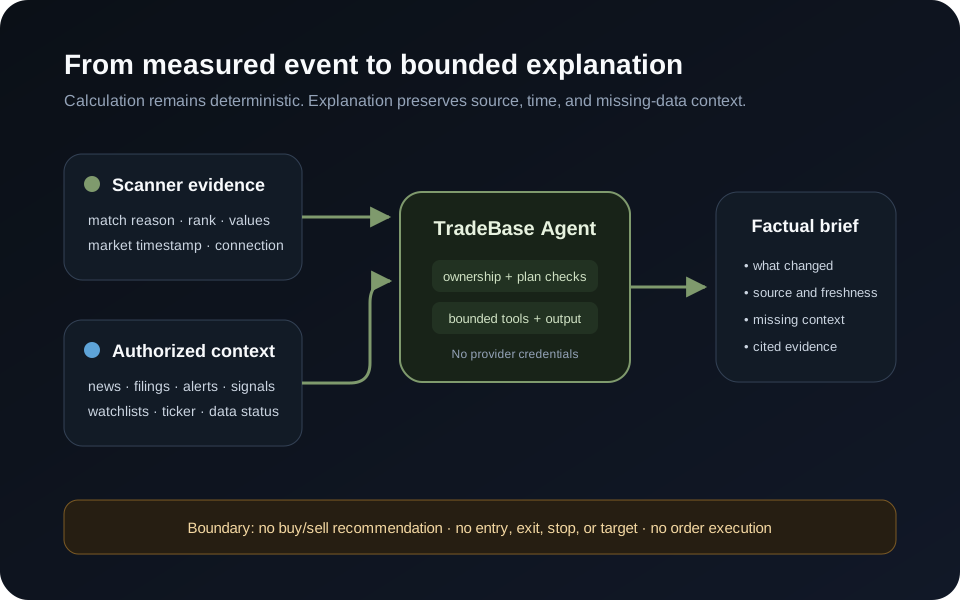
TradeBase Agent uses a typed registry for scanner, signal, alert, news, filing, watchlist, ticker, and market questions. Each tool validates input, authenticates the user, checks resource ownership and plan access, bounds results, applies a timeout, and returns structured data.
The Agent cannot run arbitrary SQL, Redis commands, shell commands, external HTTP requests, or upstream market-provider sockets. It cannot retrieve another user’s private resources.
Current snapshots and bounded price history come through the authoritative TradeBase market engine. Provider credentials, sockets, and raw publishing authority stay inside that service and are never passed to the Agent or browser.
Sources and freshness
Tool results include the available source and time context. When a source is delayed, stale, unavailable, incomplete, or no longer retrievable, the response must say so. “No recent catalyst was found in the available TradeBase sources” does not mean a catalyst cannot exist elsewhere.
The Agent message list shows a plain-language activity log while work is in progress and renders safe application or publisher links found in completed results. Internal capability names, arguments, provider plumbing, and diagnostic errors are not displayed.
Scanner and ticker context
Scanner actions can review a bounded snapshot, selected rows, changes, match reasons, catalysts, overlap, signals, watchlist membership, and alert state. Ticker briefs can combine a current snapshot with recent signals, news, filings, scanner membership, watchlist membership, alerts, and data status when those sources are available.
An Agent Brief is intentionally bounded. It identifies the active page and session, reports the available counts or recent events, lists the public symbols used in the result, and states when a requested source is not available. It does not silently replace a missing field with model memory.
Reading a generated result
Review the result in this order:
- Confirm the Current context, market session, date, and connection state.
- Match named symbols and event counts back to the scanner or alert table.
- Check source timestamps and any delayed, stale, incomplete, or unavailable labels.
- Open the linked ticker, news, filing, or scanner source before relying on an important claim.
The Agent can connect facts from authorized tools, but it cannot make an unavailable source complete or turn a scanner match into a recommendation.
Write actions
The current Agent tool registry is read-only. Any future alert or watchlist mutation must use a deterministic confirmation interface and re-check authorization on the server before changing data.